GameJolt-API-Scratch-extension
Documentation for the GameJolt API Scratch extension
1. Installation
1.1 Setup
Paste the following link into the custom extensions box.

1.2 Packaging
Paste the same link into the custom extensions box in the packager.

2. Blocks
2.1 GameJolt boolean block

This block is needed to check whether your project is run on GameJolt or not.
2.2 Session blocks
Most of the following blocks will not work unless you set the game ID and the private game key. see 2.2.1
2.2.1 Set game ID and key command block

This block is needed to set the ID and the private key of your game for the API to recognize your requests.
Important note: Do NOT share any downloadable versions of your project with the private key stored in them, posting your game on GameJolt as a web playable version is the only safe way to do it.
2.2.2 Open/Close session command block

This block is needed to open or close the game session for the API to recognize whether the user is playing the game or not.
2.2.3 Ping session command block

This block is needed to ping the session to maintain the connection with the API server.
This block is not necessary because the extension pings the session for you.
2.2.4 Session boolean block

This block is needed to check whether the current game session is active or not.
2.3 Login blocks
The following blocks will not work unless you set the game ID and the private game key. see 2.2.1
Some of the following blocks will not work unless the user is logged in. see 2.3.1
2.3.1 Login with username and token command block

This block is needed to manually login to your GameJolt profile for the API to recognize user related requests.
This block is not necessary because the extension automatically logins you when the game is played on GameJolt. It can be used to manually login in the editor.
2.3.2 Login automatically command block

This block is needed to automatically login to your GameJolt profile for the API to recognize user related requests.
This block is not necessary because the extension automatically logins you when the game is played on GameJolt.
2.3.3 Autologin boolean block

This block is needed to check whether the automatic login function is available and the API recognized the user when the game is played on GameJolt.
2.3.4 Logout command block

This block is needed to logout out of your GameJolt profile.
2.3.5 Login boolean block

This block is needed to check whether the user is logged in to their GameJolt profile or not.
2.3.6 User logged in as reporter block

This block is needed to check the username of a logged in user profile.
2.3.7 Fetch user by username/ID command block

This block is needed to fetch user profile data by user’s username or ID.
2.3.8 Fetch logged in user command block

This block is needed to fetch logged in user profile data.
2.3.9 Return fetched user’s data reporter block

This block is needed to access previously fetched user profile data.
2.3.10 Return user’s friend ID by index reporter block

This block is needed to access logged in user’s friend IDs by index.
2.4 Trophy blocks
The following blocks will not work unless you set the game ID and the private game key. see 2.2.1
The following blocks will not work unless the user is logged in. see 2.3.1
2.4.1 Achieve trophy command block

This block is needed to give logged in users a trophy by its ID. If the trophy is not secret, it will appear at their user profile.
2.4.2 Remove trophy command block

This block is needed to remove a trophy from logged in user profiles by its ID.
2.4.3 Fetch trophy data reporter block

This block is needed to access individual trophy data by it’s index or ID.
2.5 Score blocks
The following blocks will not work unless you set the game ID and the private game key. see 2.2.1
Some of the following blocks will not work unless the user is logged in. see 2.3.1
2.5.1 Add score command block

This block is needed to add user scores to your game by table ID (0 is primary table ID).
2.5.2 Add score as guest command block

This block is needed to add guest scores to your game by table ID (0 is primary table ID).
2.5.3 Fetch global/user scores command block

This block is needed to fetch global or user scores of your game by table ID (0 is primary table ID) that are better or worse than a passed value (setting it to 0 will fetch all scores). You can also specify the limit to the amount of scores you want to fetch (maximum limit is 100).
2.5.4 Fetch guest scores command block

This block is needed to fetch guest scores of your game by table ID (0 is primary table ID) that are better or worse than a passed value (setting it to 0 will fetch all scores). You can also specify the limit to the amount of scores you want to fetch (maximum limit is 100).
2.5.5 Return fetched score data reporter block

This block is needed to access previously fetched score data by index.
2.5.6 Return rank of value reporter block

This block is needed to check the rank of a passed value in a score table by table ID (0 is primary table ID).
2.5.7 Return table data reporter block

This block is needed to access individual table data by index.
2.6 Data storage blocks
The following blocks will not work unless you set the game ID and the private game key. see 2.2.1
Some of the following blocks will not work unless the user is logged in. see 2.3.1
2.6.1 Set data command block

This block is needed to set global/user keys with data (if the passed key doesn’t yet exist in the storage, a new item with that key and data will be created).
2.6.2 Fetch data reporter block

This block is needed to access fetched global/user data by key.
2.6.3 Update data reporter block

This block is needed to update global/user data with a passed value.
2.6.4 Remove data command block
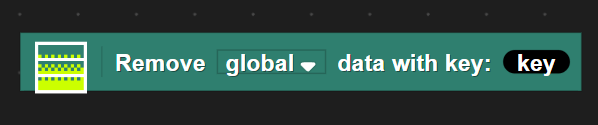
This block is needed to remove global/user data by key.
2.6.5 Fetch keys reporter block

This block is needed to access fetched keys that are following the passed pattern value by index, the placeholder character for patterns is *.
2.7 Return server time reporter block
The following block will not work unless you set the game ID and the private game key. see 2.2.1

This block is needed to access server’s current time.
3. Error descriptions
3.1 The game ID you passed in does not point to a valid game
This error means that the game ID and the private game key are not set or are incorrect. see 2.2.1
3.2 No user logged in
This error means that the username and the game token are not set or are incorrect. see 2.3.1
3.3 No index found
This error means that the index you passed is incorrect, please make sure that your index is:
- Not a floating point value.
- Not a string value.
- Not out of range.
3.4 No item found
This error means that the menu item you passed is incorrect, which is unexpected to happen.
4. Examples
This paragraph is work in progress.
5. Troubleshooting
If something doesn’t work, refer to the following steps:
- Check if you have set the game ID and the private game key. see 2.2.1
- Check if you are logged in. see 2.3.1
- Read what the error messages say, if you’re having a trouble understanding them, see 3.
Note: It is not the extension’s issue if the command blocks return “undefined”, they should still be working properly.